

The Complete Guide to Data Sanitization: Methods, Standards, and Best Practices
Why Data Sanitization Is Now a Boardroom Priority
Data has become one of the most valuable assets in modern business. From customer records and financial information to intellectual property and strategic plans, organizations store enormous volumes of sensitive data across laptops, servers, mobile devices, storage drives, and cloud environments.
When those assets reach end-of-life, organizations face a significant cybersecurity, compliance, and business risk challenge. Improperly disposed storage devices can contain recoverable data, potentially leading to regulatory penalties, reputational damage, financial loss, and data breaches.
Data sanitization is the process of permanently removing data from storage media so it cannot be recovered, reconstructed, or accessed by unauthorized parties. When implemented correctly, it protects organizations from future data exposure while supporting compliance, governance, and sustainability objectives.
Understanding the Three Levels of Data Sanitization
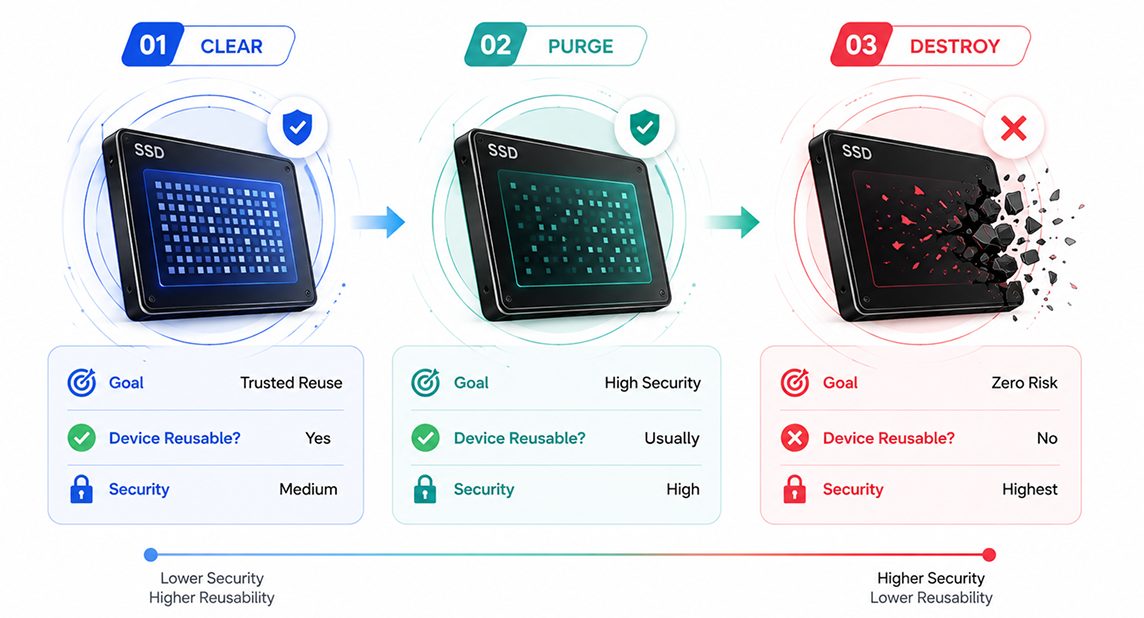
Data sanitization methods are typically grouped into three levels: Clear, Purge, and Destroy. The appropriate choice depends on data sensitivity, compliance obligations, and the future use of the device.
Level 1: Clear – For Trusted Reuse
Clearing removes data through software-based overwriting techniques while keeping the device operational. Organizations commonly use clearing when reassigning laptops, refreshing internal IT assets, or reusing storage devices within controlled environments. The goal is efficient data removal while preserving usability.
Level 2: Purge – For High-Security Environments
Purging goes beyond standard overwriting and is designed to make data recovery practically impossible, even with advanced forensic techniques. It is frequently used for customer databases, healthcare records, financial information, intellectual property, and enterprise storage systems.
Understanding the Key Data Purge Methods
Modern storage technologies, particularly SSDs and enterprise flash storage, require sanitization techniques that go beyond traditional overwriting. Three of the most commonly used purge methods are Secure Erase Commands, Cryptographic Erasure, and Firmware-Based Sanitisation.
Secure Erase Commands
Secure Erase is a storage-device command built directly into drive firmware. When executed, the drive performs an internal sanitization process that removes user-accessible data and addresses areas that software-based overwriting may miss.
How it works: The command instructs the storage device to internally erase data across memory cells and storage locations managed by the controller.
| Advantages: | Limitations: |
|---|---|
| Fast execution, even on large drives | Effectiveness depends on manufacturer implementation |
| Designed for modern SSD architectures | Requires verification and reporting |
| Supports device reuse | May not satisfy environments that require physical destruction |
Use cases: Internal redeployment, IT asset disposition programs, device refurbishment, and remarketing.
Cryptographic Erasure
Cryptographic Erasure relies on encryption. Instead of deleting every block of data, the encryption keys that make the data readable are securely destroyed.
How it works: Data remains encrypted on the device, but without the encryption keys it becomes computationally unreadable.
| Advantages: | Limitations: |
|---|---|
| Extremely fast regardless of storage capacity | Requires encryption to be properly implemented beforehand |
| Ideal for large-scale environments | Depends on strong key management practices |
| Minimizes operational downtime | Not suitable for devices that were never encrypted |
Use cases: Data centers, cloud environments, self-encrypting drives, and financial institutions.
Firmware-Based Sanitisation
Firmware-Based Sanitisation uses storage-device firmware functions to perform secure data removal.
How it works: The device controller initiates internal sanitization routines that can address hidden, reserved, or inaccessible storage areas.
| Advantages: | Limitations: |
|---|---|
| Device-specific sanitization | Capabilities vary by manufacturer |
| Addresses areas external software may not reach | May require specialized tools and validation |
| Supports compliance-focused workflows | Compliance requirements must be verified |
Use cases: Enterprise SSD deployments, government environments, and compliance-driven organizations.
Level 3: Destroy – When Zero Risk Is the Goal
Physical destruction methods such as shredding, crushing, disintegration, and degaussing permanently render storage devices unusable. Destruction is commonly selected when the consequences of data exposure are unacceptable.
When Each Method Is Appropriate
Clear – Best for Internal Reuse
Clear is ideal for internal device reuse and routine IT asset refreshes. It securely removes data while keeping the device fully operational, making it a cost-effective solution for trusted environments where devices remain within the organization.
Purge – Best for Sensitive Data and External Transfers
Purge is recommended for devices containing confidential or regulated data that are being resold, refurbished, donated, or transferred outside the organization. It provides a high level of security by making data recovery practically impossible, even with advanced forensic tools.
Destroy – Best for Maximum Security
Destroy is the preferred option when zero data recovery is required. It is commonly used for classified information, highly sensitive business data, or damaged storage devices that cannot be securely sanitized. Although the device cannot be reused, it offers the highest level of data protection.
Global Standards That Govern Data Sanitization
Effective sanitization follows recognized standards rather than ad-hoc practices.
NIST SP 800-88 Rev. 1 remains the primary global reference for media sanitization and defines Clear, Purge, and Destroy methodologies.
IEEE standards provide guidance for storage security, information assurance, and data lifecycle management.
HMG Infosec standards support risk-based sanitization and secure media handling within UK government environments.
DoD methodologies continue to influence high-security and defense-related sanitization programs.
What Audit-Ready Sanitization Looks Like
An audit-ready sanitization program includes documented procedures, automated verification, detailed reporting, chain-of-custody tracking, and tamper-proof certificates. Together, these controls help organizations demonstrate compliance and prove that sanitization was completed successfully.
Common Mistakes Organizations Make
1. Assuming Deletion Is Enough
Many organizations believe that deleting files, formatting a drive, or performing a factory reset permanently removes data. In reality, the data can often still be recovered using specialized tools. Proper data sanitization is essential to ensure information is permanently erased.
2. Ignoring SSD-Specific Challenges
Unlike traditional hard drives, SSDs use technologies like wear-leveling and over-provisioning, which can prevent standard overwrite methods from reaching all storage areas. Using SSD-specific sanitization methods helps ensure complete and secure data removal.
3. Missing Documentation and Verification Records
Without verification reports, audit logs, or certificates of erasure, organizations may struggle to prove that sanitization was completed successfully. Proper documentation is essential for compliance, audits, and maintaining customer trust.
4. Using Inconsistent Processes Across Locations
Following different sanitization procedures across offices or departments can create security gaps and increase compliance risks. Implementing standardized processes ensures every device is sanitized consistently and securely.
5. Treating Sanitization as an End-of-Life Activity
Many organizations view data sanitization as something to do only before device disposal. Instead, it should be part of the entire IT asset lifecycle, including redeployment, refurbishment, resale, and recycling, to reduce risk and strengthen data security.
TruWipe® helps organizations implement secure, automated, and verifiable data sanitization workflows through standards-aligned processes, audit trails, verification-based validation, and support for sustainable device reuse programs.
Conclusion
Every retired storage device represents either a security risk or an opportunity to demonstrate strong governance. Effective data sanitization protects sensitive information, supports compliance, reduces breach risk, and contributes to sustainability goals.
Organizations should align sanitization methods with data sensitivity, regulatory requirements, and business objectives. The most effective programs treat data sanitization as a core component of cybersecurity, compliance readiness, risk management, and digital trust.

